注意:
- 下面的迁移步骤不包括迁移elasticsearch的数据
- 迁移之前,建议开启维护模式,系统设置里开启,这样迁移过程中不允许用户操作,以免导致迁移后丢失新增的数据。
- 迁移之前,登录cdnhao.com后台,点击“授权IP下载文件”按钮,输入新的主控IP,以便允许下载主控文件来迁移
旧主控能打开的情况
1. 旧主控后台执行迁移操作
登录旧主控后台,切换到“系统管理”->"维护操作",在主控迁移处填写相关的信息,如图:
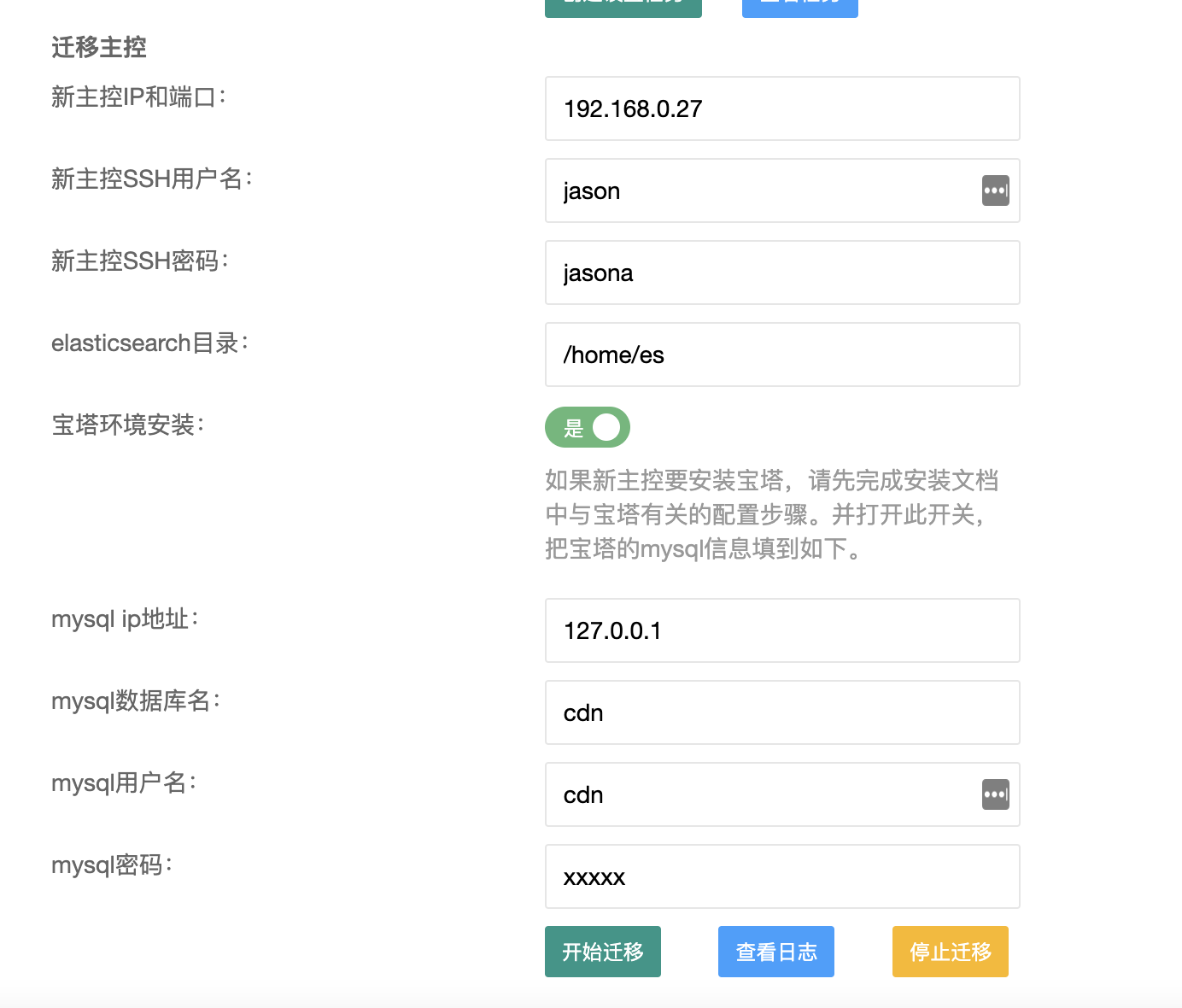
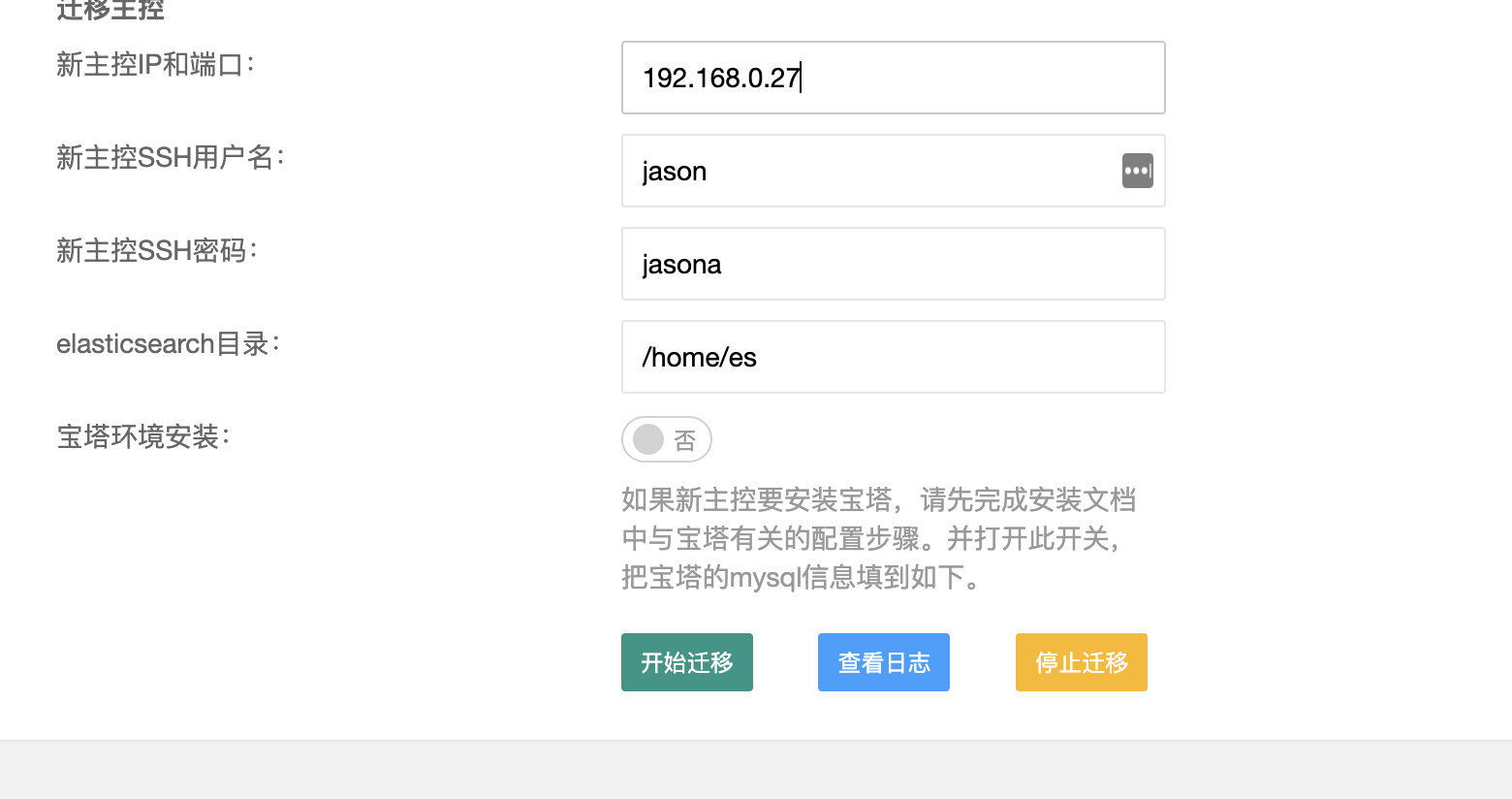 如果新主控要安装宝塔,请先安装好宝塔,并按照安装文档中的宝塔部分完成操作(即安装文档中宝塔的1-5,7步骤,第6步骤不用操作),之后在宝塔环境安装点击开关,如图:
2. 替换节点的主控IP
等第一步的操作完成后,还是在旧主控后台的“系统管理”->"维护操作",在节点设置处,填入新主控IP,并点击"创建设置任务",如图:
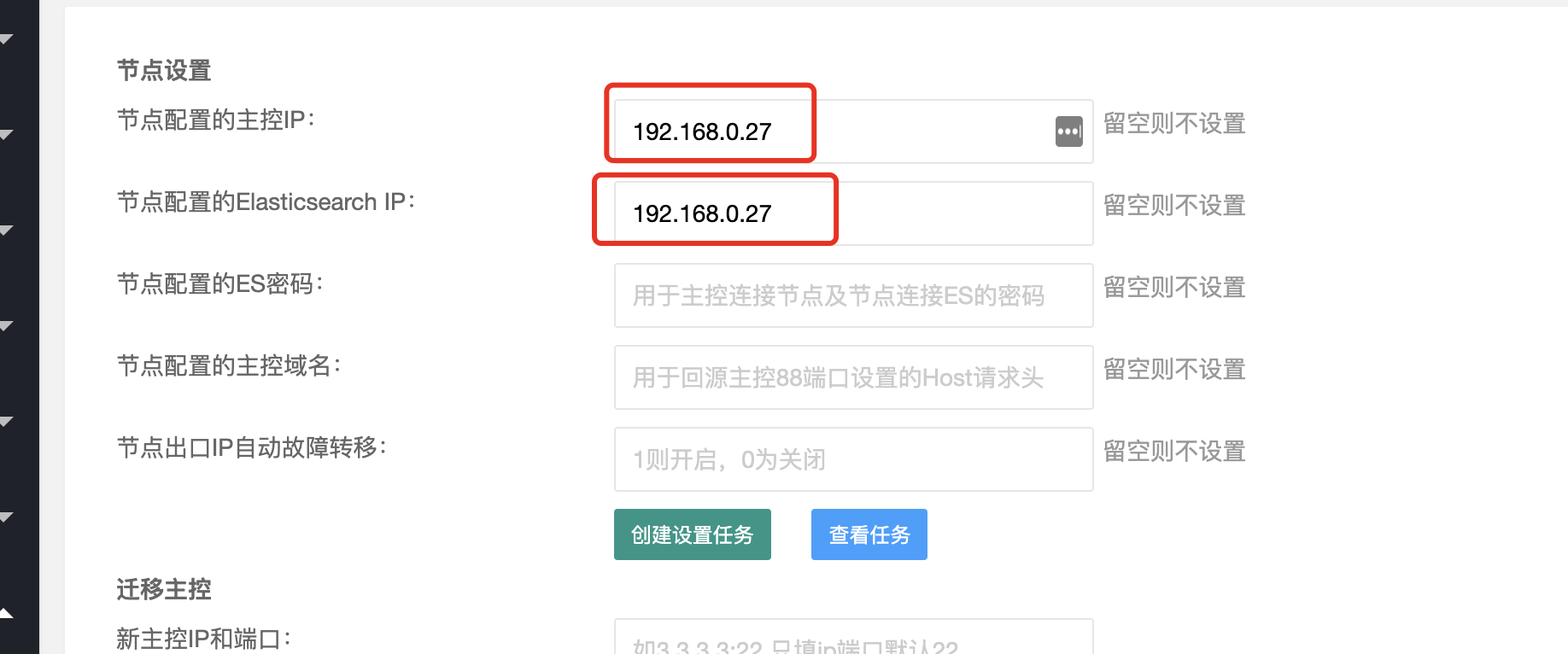 点击“创建设置任务”后,点击查看任务,待全部任务执行完成后,看下一步操作
3. 替换授权IP
登录官网,把授权中的主控IP替换为新的
点击“创建设置任务”后,点击查看任务,待全部任务执行完成后,看下一步操作
3. 替换授权IP
登录官网,把授权中的主控IP替换为新的
4. 登录新主控后台检查 登录新主控后台,检查看数据是否已经迁移过来,在主控首页“Agent状态”处点击“立即检查”,查看检查任务是否正常 5. 关闭旧主控 登录旧主控服务器,执行如下命令来关闭
supervisorctl -c /opt/cdnhao/master/conf/supervisord.conf stop all;
sed -i '/cdnhao/d' /etc/rc.local || true;
sed -i '/cdnhao/d' /etc/rc.d/rc.local || true;
(crontab -l | grep -v /opt/cdnhao/master/sh/monitor_task.sh) | crontab -;
旧主控无法打开的情况
1 备份旧主控数据 在旧主控执行如下命令开始备份
cd /root;
curl http://us.cdnhao.com/cdnhao/backup_master.sh -o backup_master.sh;
chmod +x backup_master.sh;
./backup_master.sh;
这时候将在目录/root下,打包生成cdn.sql.gz文件,请把这个文件传输到新主控的/root/目录下,可以使用scp命令,命令如下:
cd /root
scp cdn.sql.gz   root@新主控IP:/root/
2 在新机器安装好主控程序 首先登录cdnhao.com,更新授权为新主控ip,并清空机器码 登录旧主控机器,执行如下命令查看版本:
grep VERSION_NAME /opt/cdnhao/master/conf/config.py
如下图,版本为v4.1.6:
 登录新机器,执行如下命令安装:
curl http://dl2.cdnhao.com/cdnhao/master.sh -o master.sh;
chmod +x master.sh;
./master.sh --ver v4.1.60;
其中v4.1.60替换成自己的主控版本号 如果是与宝塔一起安装,请使用如下命令:
curl -m 5 http://dl2.cdnhao.com/cdnhao/master.sh -o master.sh || curl -m 5 http://us.cdnhao.com/cdnhao/master.sh -o master.sh;
chmod +x master.sh;
./master.sh --es-dir /home/es --no-mysql --mysql-ip 127.0.0.1 --mysql-db 数据库名 --mysql-user 数据库用户名 --mysql-pass 数据库密码 --mysql-port 3306  --with-bt --ver v4.1.60;
其中v4.1.60替换成自己的主控版本号 3 登录新主控,恢复备份和config. py,初始化es 1)执行如下命令恢复数据库
cd /root;
curl http://us.cdnhao.com/cdnhao/restore_master.sh -o restore_master.sh;
chmod +x restore_master.sh;
./restore_master.sh;
2)执行命令恢复config.py文件:
scp root@旧主控IP:/opt/cdnhao/master/conf/config.py /opt/cdnhao/master/conf/config.py
3)执行如下命令初始化es:
cd /tmp
wget us.cdnhao.com/cdnhao/int_es.sh -O int_es.sh;
chmod +x int_es.sh;
./int_es.sh /home/es;
supervisorctl -c /opt/cdnhao/master/conf/supervisord.conf restart all;
其中/var/lib/elasticsearch为es的数据目录,可以更改成其它的,比如/home/es 4 替换节点的主控IP 在所有节点,执行如下命令:
new_master_ip="这里替换为主控IP";
sed -i "s/ES_IP =.*/ES_IP = \"$new_master_ip\"/" /opt/cdnhao/agent/conf/config.py;
sed -i "s/MASTER_IP.*/MASTER_IP = \"$new_master_ip\"/g" /opt/cdnhao/agent/conf/config.py;
sed -i "s/hosts:.*/hosts: [\"$new_master_ip:9200\"]/" /opt/cdnhao/agent/conf/filebeat.yml;
chattr -i /usr/local/openresty/nginx/conf/listen_80.conf /usr/local/openresty/nginx/conf/listen_other.conf ;
chattr -i /usr/local/openresty/nginx/conf/;
sed -i "s#http://.*:88#http://$new_master_ip:88#" /usr/local/openresty/nginx/conf/listen_80.conf /usr/local/openresty/nginx/conf/listen_other.conf ;
ps aux | grep [/]usr/local/openresty/nginx/sbin/nginx | awk '{print $2}'  | xargs kill -HUP ||  true;
supervisorctl -c /opt/cdnhao/agent/conf/supervisord.conf restart filebeat;
supervisorctl -c /opt/cdnhao/agent/conf/supervisord.conf restart agent;
supervisorctl -c /opt/cdnhao/agent/conf/supervisord.conf restart task;
5 迁移完成 登录新主控后台,在首页点击检查agent,如果没有错误,表示主控迁移完成。